

SUM (Running Total)
Using =SUM() For A Running Total

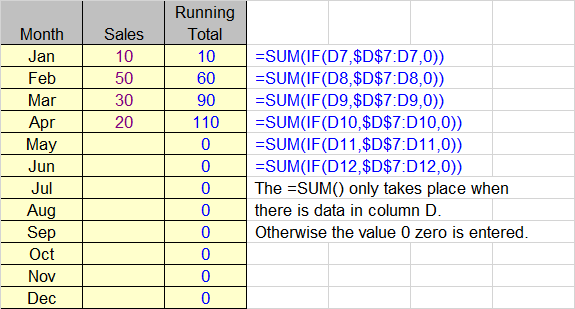
Type the formula =SUM($D$7:D7) in cell E7 and then copy down the table.
It works because the first reference uses dollar symbols $ to keep $D$7 static
as the formula is copied down. Each occurrence of the =SUM() then adds all
the numbers from the first cell down.
The function can be tidied up to show 0 zero when there is no adjacent value
by using the =IF() function.


 Hello, my name is Amit Gupta. I'm a 28 year old passionate about computer Youtube & Blogger.
कोई टिप्पणी नहीं:
एक टिप्पणी भेजें